[OpenCV] SIFT implementation in OpenCV 2.4

#include "opencv2\opencv.hpp"

#include <stdio.h>
#include <opencv2/legacy/legacy.hpp>
#include <opencv2/objdetect/objdetect.hpp>
#include <opencv2/nonfree/nonfree.hpp>
#include <opencv2/nonfree/features2d.hpp>

using namespace std;
using namespace cv;

//
int main(  )
{
        //source image
	char* img1_file = "C:/images/box.png";
	char* img2_file = "C:/images/box.png";

	// image read
	Mat tmp = cv::imread( img1_file, 1 );
	Mat in  = cv::imread( img2_file, 1 );

	/* threshold      = 0.04;
	   edge_threshold = 10.0;
	   magnification  = 3.0;	*/

	// SIFT feature detector and feature extractor
	cv::SiftFeatureDetector detector( 0.05, 5.0 );
	cv::SiftDescriptorExtractor extractor( 3.0 );

	/* In case of SURF, you apply the below two lines
	cv::SurfFeatureDetector detector();
	cv::SurfDescriptorExtractor extractor();
	*/

	// Feature detection
	std::vector keypoints1, keypoints2;
	detector.detect( tmp, keypoints1 );
	detector.detect( in, keypoints2 );

	// Feature display
	Mat feat1,feat2;
	drawKeypoints(tmp,keypoints1,feat1,Scalar(255, 255, 255),DrawMatchesFlags::DRAW_RICH_KEYPOINTS);
	drawKeypoints(in,keypoints2,feat2,Scalar(255, 255, 255),DrawMatchesFlags::DRAW_RICH_KEYPOINTS);
	imwrite( "feat1.bmp", feat1 );
	imwrite( "feat2.bmp", feat2 );
	int key1 = keypoints1.size();
	int key2 = keypoints2.size();
	printf("Keypoint1=%d \nKeypoint2=%d", key1, key2);

	// Feature descriptor computation
	Mat descriptor1,descriptor2;
	extractor.compute( tmp, keypoints1, descriptor1 );
	extractor.compute( in, keypoints2, descriptor2 );
	/*int desc1 = descriptor1.size;
	int desc2 = descriptor2.size;
	printf("Descriptor1=%d \nDescriptor2=%d", desc1, desc2);*/

	// corresponded points
	std::vector matches;

	// L2 distance based matching. Brute Force Matching
	BruteForceMatcher<L2 > matcher;

	// Flann-based matching
	//FlannBasedMatcher matcher;

	// display of corresponding points
	matcher.match( descriptor1, descriptor2, matches );

	// matching result
	Mat result;
	drawMatches( tmp, keypoints1, in, keypoints2, matches, result );

	// output file
	imwrite( "result.bmp", result );

	// display the result
	namedWindow("SIFT", CV_WINDOW_AUTOSIZE );
	imshow("SIFT", result);
	waitKey(0); //press any key to quit

	return 0;
}

Input image:box

Result:

sift_result

ICPR2012 International Conference on Pattern Recognition, Tsukuba Japan

Oral Presentation at International Workshop on Computational Forensic, ICPR2012

Presentation slide:

Poster Shotgun ICPR2012

KOSAM bersama rekan IPTIJ

Barakallah fi umrik ya Zawjati

Istriku, Selamat Milad 🙂
Semoga Allah senantiasa melimpahkan kesehatan,
memberikan Ridho dan Rahmat-Nya, serta melindungimu dalam keselamatan dan keberkahan usia.

Barakallah fi umrik ya zawjati.
Uhibbuki mitsla maa antii. Uhibbuki kaifa maa kuntii.
#LoveYouLillah

Continue reading

[ffmpeg] How can I combine hundreds of images into a movie

FFmpeg is a light and complete, cross-platform solution to record, convert and stream audio and video. This software is free and and powerful to use especially when you are about to work with images and videos. There are tons of tutorial you may find on the internet (here, or may be here). As a FFmpeg-beginner I would love to share my experience on combining numerous images in one folder to be compiled into a movie (for example “.avi” format video, etc).

Source of images:

You only need to type this script:

ffmpeg -r 25 -i "imagePath.jpg" -vcodec mjpeg -sameq out.avi

in my case, I execute this script:

ffmpeg -r 25 -i "conditionA_conditionH_%04d.png" -vcodec mjpeg -sameq SURFresult.avi

Video result:

Other script:
Movie ⇒ Image frames †

ffmpeg -i input.mpg -f image2 -vcodec mjpeg (-qscale 1 -qmin 1 -qmax 1) (-ss 1.5 -t 10.5) "imgFrame%06d.jpg"

Movie ⇒ Sound †

ffmpeg -i input.mpg -vn (-ac1) music.wav

Image capture †

ffmpeg -f x11grab -s xga -r 30 -qscale 1 -i :0.0 out.mpg

[Books] What I Wish I Knew When I Was 20

Recently, I stumbled upon an interesting book on the topic of entrepreneur and creativity. Without thinking too much, I just went to Amazon and purchased the book. The tittle is “What I Wish I Knew When I Was 20: A Crash Course on Making Your Place in the World” by Tina Seelig.


Buy from Amazon.co.jp
Buy from Amazon.com

Yet, I am still on the way reading the entire stories. They are interesting to read because Tina Seelig points out each sections by telling about her experience during her class at Stanford University or stories about her family.

There are some quotes that might be interesting:

1. Buy One, Get Two Free
– Story on the “Five-Dollars Challenge”, a success way in teaching students about having an entrepreneurial mind-set. The mission is about to multiply a 5 dollars envelope to be as much profit as possible within a very limited time. The much money they get, the better they accomplish the mission. Yet, Tina also quoted that sometime the Value is not always measured in terms of financial rewards.
– The points are: identifying opportunities, challenging assumptions, leveraging the limited resources.
– Inspiration from a story about Kyle MacDonald, who started with one red paper clip and traded up until he had a house. Check the details on www.oneredpaperclip.com
– “The bigger the problem, the bigger the opportunity. Nobody will pay you to solve a non-problem.” Vinod Khosla, co-founder of Sun Microsystem.

2. The Upside-Down Circus
– We can challenge ourselves every single day. That is, we can choose to view the world through different lenses– lenses that allow us to see problems in a new light. The more we take on problems, the more confident and proficient we become at solving them. And the better able we are to see them as opportunities.
– The more experience you have tackling problems, the more confident you become that you can find a solution.

3. Bikini or Die
– One of the biggest obstacles to taking on “impossible tasks” is that others are often quick to tell you they can’t be accomplished. It is arguably tough to address a grand problem. But once you decide to take it on, it is equally hard to break out of traditional approaches to solving it. This is another place where it is helpful to break a few rules. In other words, we need to “BREAK THE RULES!”.

4. Please Take Out Your Wallets
– The world is divided into people who wait for others to give them permission to do the things they want to do and people who grant them selves permission. Some look inside themselves for motivation and others wait to be pushed forward by outside forces.
– Ideas just waiting for someone to exploit them.
– Story of Michael Dearing that implemented the new method on selling products in eBay. He introduced the idea to put photos in eBay. He found that products with accompanying photos sold faster and at a higher price than products without photos.
– People who get to the top work harder than those around them, they have more energy that propels them forward, and they’re markedly more driven to get there.
– “The biggest ally of super-achievers is the inertia of others” –David Rothkopf
– If you want a leadership role, then take on leadership roles. Just give yourself permission to do so. Look around for holes in your organization, ask for what you want, find ways to leverage your skills and experiences, be willing to make the first move, and stretch beyond what you’ve done before.
– There are always opportunities waiting to be exploited. Instead of waiting to be asked and tiptoeing around an opportunity, seize it! It takes hard work, energy, and drive –but these are the assets that set leaders apart from who wait for others to anoint them.

5. The Secret Sauce of Silicon Valley

6. No Way… Engineering Is for Girls

7. Turn Lemonade into Helicopters

8. Paint the Target around the Arrow

9. Will This Be on the Exam?

10. Experimental Artifacts
Continue reading

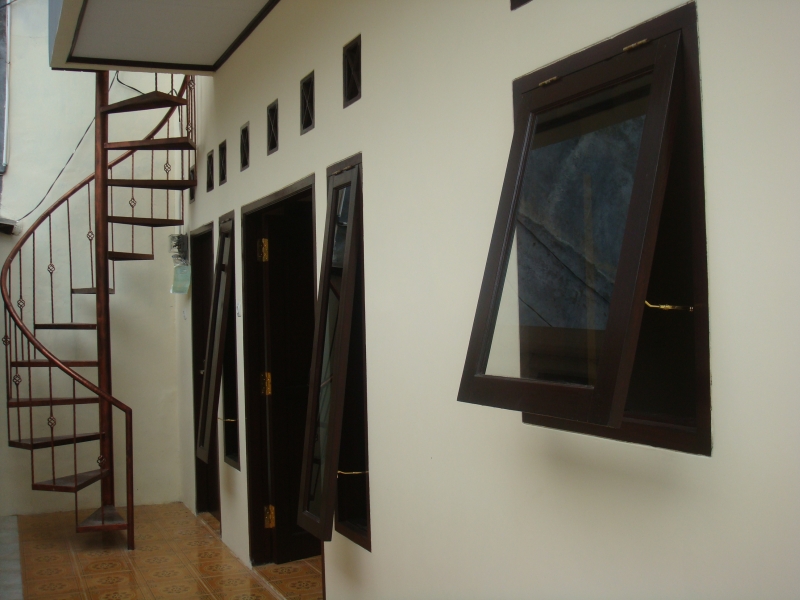
Kontrakan rumah dan kamar kost di daerah Cilandak danCiganjur, Jakarta Selatan

Kontrakan Rumah
di Cilandak
Dikontrakkan rumah di Jalan
Cilandak Tengah III No. 40, Jakarta Selata (dekat masjid Al-Falah
di belakang Menara Talavera atau Cilandak Town Square). Sangat
cocok untuk kontrakan keluarga kecil atas pasangan pengantin baru.
Lingkungan sekitar sangat nyaman dan kekeluargaan. Tidak berisik
kendaraan bermotor dan lingkungan bersih.
Keterangan: – Luas bangunan sekitar
30m2 dan memiliki beranda depan untuk parkir motor dan jemuran. –
Ruang keluarga, kamar tidur, dapur dan kamar mandi – Kamar mandi
(WC duduk dan shower) – Dapur (Wastafel, Tempat cuci piring dan
kompor gas) – Ada pintu gerbang – Listrik 2300 Watt
Akses: – 15 menit jalan kaki ke RSUP
Fatmawati. Dekat dengan puskesmas Terogong. – Dekat dengan
lingkungan persekolahan dekat (SD, SMP, SMA baik yang negeri maupun
swasta) – Dekat dengan Cilandak Town Square dan pusat perbelanjaan
lainnya (Superindo, Total, dll) – Dekat dengan pusat elektronik ITC
Fatmawati – Akses angkutan kota ke BlokM, Lebak Bulus, Depok banyak
Sewa: – Rp 1.500.000/bulan (Diutamakan
untuk sewa selama minimal 6 bulan) Silakan kontak ke nomor telepon:
021-7590-7932 (dengan ibu Rafi’ah atau bapak Hasbullah)
Foto:

Beranda depan

Pintu depan

Kamar tidur

Pintu
tengah(r.keluarga-dapur)

Dapur

Kamar mandi

Diiklankan di forum
Kaskus: http://www.kaskus.co.id/post/50b57248ea74b4a60600005f#post50b57248ea74b4a60600005f
Kamar
Kost
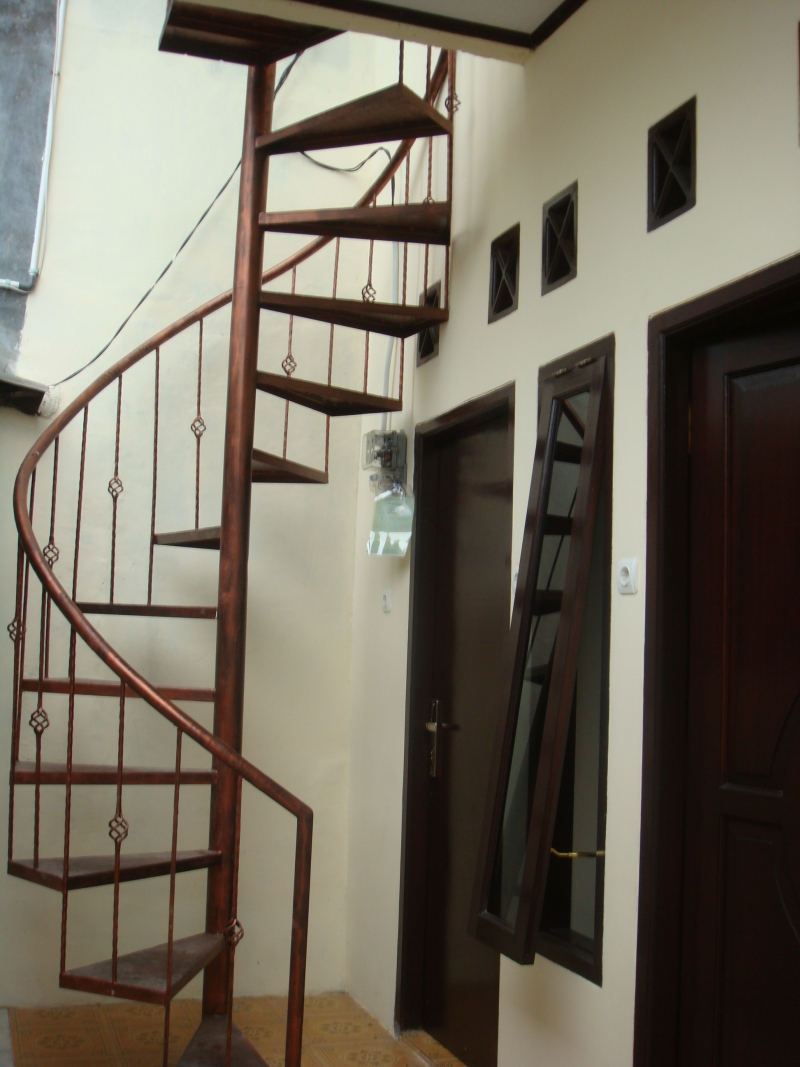
Disewakan 2 unit Kamar Kost
(lantai dua) di Jalan Cilandak Tengah III No. 40, Jakarta Selata
(dekat masjid Al-Falah di belakang Menara Talavera atau Cilandak
Town Square). Lingkungan sekitar sangat nyaman dan kekeluargaan.
Tidak berisik kendaraan bermotor dan lingkungan bersih.
Keterangan: – Kamar tidur – Kasur –
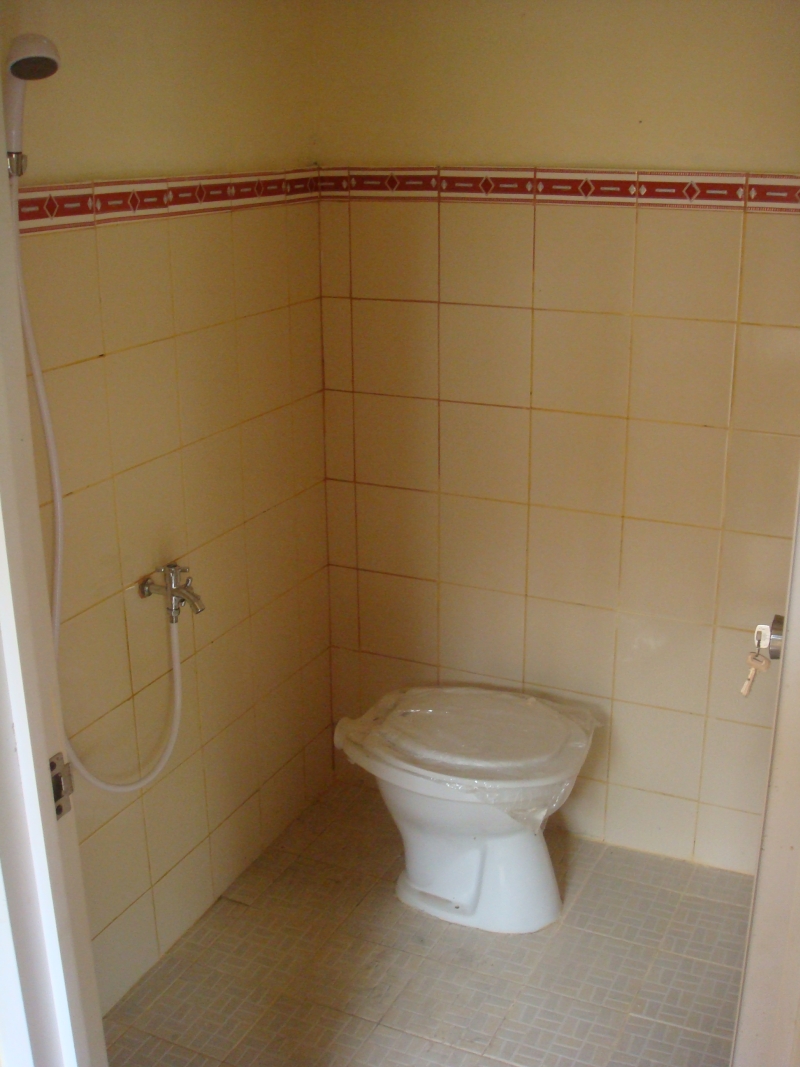
Lemari – Kipas angin kecil – Kamar mandi (WC duduk dan shower) –
Ada pintu gerbang Akses: – 15 menit
jalan kaki ke RSUP Fatmawati. Dekat dengan puskesmas Terogong. –
Dekat dengan perkantoran (Talavera, Talavera II, Ratu Prabu)dan
mall – Dekat dengan lingkungan persekolahan dekat (SD, SMP, SMA
baik yang negeri maupun swasta) – Dekat dengan Cilandak Town Square
dan pusat perbelanjaan lainnya (Superindo, Total, dll) – Dekat
dengan pusat elektronik ITC Fatmawati – Akses angkutan kota ke
BlokM, Lebak Bulus, Depok banyak Sewa:
– Rp 800.000/bulan (bisa negosiasi) Silakan kontak ke nomor
telepon: 021-7590-7932 (dengan ibu Rafi’ah atau bapak Hasbullah)
Foto:

Ruang utama

Pintu utama

Kamar mandi

Tangga ke kamar kost

Shower

WC duduk

Diiklankan di forum
Kaskus: http://www.kaskus.co.id/post/50b573a8e874b4515900011d#post50b573a8e874b4515900011d
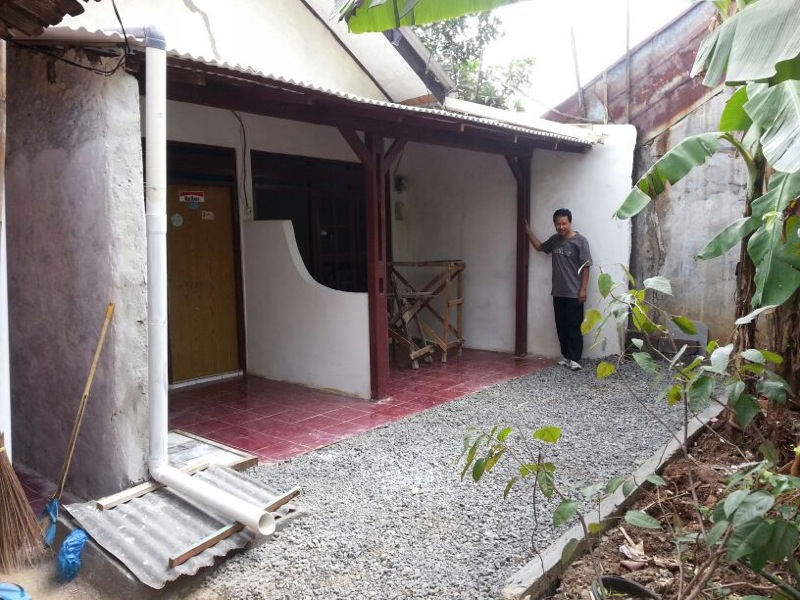
Kontrakan Rumah
di Ciganjur (2 unit)
Dikontrakkan rumah
di Jalan Al Hidayah, Alhidayah samping SD Cipedak, dekat Cilandak
Marinir, Jakarta Selatan. Sangat cocok untuk kontrakan keluarga
kecil atas pasangan pengantin baru. Lingkungan sekitar sangat
nyaman dan kekeluargaan. Keterangan:
Luas bangunan sekitar 30m2 dan memiliki beranda depan untuk parkir
motor dan jemuran. – Ruang keluarga, kamar tidur, dapur dan kamar
mandi – Lantai keramik (dari depan sampai dapur) – Listrik, Air
(mesin pompa baru) – Kamar mandi, wastafel – Dapur (Wastafel,
Tempat cuci piring dan kompor gas) – Listrik 1300 Watt
Akses: – Dekat pusat hiburan Cilandak
Mall, Superindo, Matahari dept store, Pasar, Polsek. – Dekat Kampus
ISTN, APP (Akademi Pimpinan Perusahaan) – Dekat dengan kampus ISTN
– Dekat dengan lingkungan persekolahan dekat (SD, SMP) – Akses
angkutan kota ke BlokM Sewa: – Rp
600.000/bulan (Diutamakan untuk sewa selama minimal 6 bulan)
Silakan kontak ke nomor telepon: 021-7590-7932 (dengan ibu Rafi’ah
atau bapak Hasbullah) Foto:

Beranda depan

Pintu depan

Dua unit kontrakan

Ruang dalam

Kamar mandi

Kamar belakang

Video:


Diiklankan di forum Kaskus:
http://www.kaskus.co.id/post/510fce9f8127cf145f000004

Mohon Doa dan Restu (Fahmi&Uci Wedding)

Bismillahirrohmanirrohim

Assalammu’alaykum warahmatullahi wabarakatuh,

Dengan memohon Ridho dan Rahmat Allah SWT teriring niat ikhlas beribadah kepada-Nya, perkenankanlah kami :

Dzulfahmi (Fahmi) dan Fawzia Novianti (Uci)
http://fahmidanuci.com/

mengundang teman-teman untuk menghadiri momen bahagia kami yang insya Allah akan dilaksanakan pada:

AKAD & RESEPSI PERNIKAHAN
Sabtu, 1 September 2012
Akad Nikah, pukul 07.30 – 09.00 WIB
Resepsi, pukul 11.00 – 13.00  WIB
di Hotel Bumi Wiyata, Depok


RESEPSI PERNIKAHAN – NGUNDUH MANTU
Ahad (Minggu), 9 September 2012
pukul 11.00  WIB s.d selesai
di rumah mempelai Pria
Jalan Cilandak Tengah III No.40 Rt.003/Rw 01 (dekat masjid Al-Falah)
Cilandak Barat Jakarta Selatan, Jakarta 12430

Merupakan suatu kehormatan dan kebagiaan bagi kami apabila teman-teman berkenan hadir untuk memberikan doa restu kepada kami.

Wassalamu’alaykum warahmatullahi wabarakatuh

Kami yang berbahagia,
Fahmi & Uci
http://fahmidanuci.com/

Dan di antara tanda-tanda kekuasaan-Nya ialah Dia menciptakan untukmu isteri-isteri dari jenismu sendiri, supaya kamu cenderung dan merasa tenteram kepadanya, dan dijadikan-Nya di antaramu rasa kasih dan sayang. Sesungguhnya pada yang demikian itu benar-benar terdapat tanda-tanda bagi kaum yang berpikir. (QS. 30:21)


Continue reading

Jejak Ramadhan 1433H

Marhaban Yaa Ramadhan!

Dalam postingan kali ini, saya akan mencoba untuk membuat sebuah gallery yang berisi rekaman peristiwa selama Ramadhan 1433H. Semoga Ramadhan tahun ini selalu dipenuhi dengan keberkahan dan hal-hal positif yang bermanfaat.

Oh iya, sebagian besar foto-fotonya saya upload via instagram dan di-retweet juga melalui akun Twitter pribadi.

※ Jejak Ramadhan 1433H ※


[Matlab] How do I plot to an image and save the result without displaying it?

I am a newbie in Matlab and got some troubles on handling image. This work inspired from the previous post on Stackoverflow forum: question link. I tried to search the best solution to solve my problem and finally found the answer.

As a Matlab newbie, the below codes help me alot!
This is especially when I am trying to execute hundreds of image processing algorithms and need to save all the result without displaying any output on the pop up window.

% Input image
img = imread('c:/images/testImage.jpg');

% Define the figure position
f = figure('Position', [100 100 100 100]);

% Do not display the output image
set(f, 'visible', 'off');

% Scales image data to the full range of the current colormap
imagesc(img);

% "hold on" retains the current graph and adds another graph to it
hold on;

%# define points (in matrix coordinates)
p1 = [10,100];
p2 = [100,20];

%# Plot the points.
%# Note that depending on the definition of the points,
%# You may have to swap x and y
%# Draw diagonal lines across the image
%# In my case, I change the below loop with other image processing algorithm
for i = 1:5
   plot([p1(2)*i,p2(2)*i],[p1(1)*i,p2(1)*i],'Color','r','LineWidth',2)

   % Output file path
   resultImagePath = sprintf('c:/images/resultImage_%d.jpg', i);

   % Save output images
   saveas(f, resultImagePath, 'jpg');
   % See the difference when you execute the below code
   %imwrite(img, resultImagePath, 'jpg');
end

% "hold off" resets hold state to the default behavior
hold off;

% Close the "do-not-display function"
close(f);

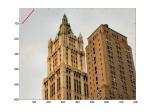
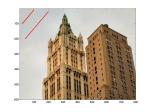
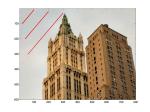
Input and output images:

The Real Output of my experiment: