Bagi rekan-rekan yang saat ini sedang sibuk ikutan seminar mencari kerja (job hunting) atau sedang pergi sana pergi sini untuk tes / interview lamaran kerja mungkin terkadang sering merasakan kejenuhan atau bahkan CAPEK lahir batin karena belum ada respon dari perusahaan yang memanggil kita wawancara. Saya pun pernah merasakan hal yang sama ketika beberapa waktu lalu mencoba berjuang melamar kerja ke beberapa perusahaan di negeri Sakura.
Di Jepang, aktivitas mencari pekerjaan (就職活動 | Shuushoku katsudou) untuk pelajar Universitas biasanya sudah dimulai sekitar satu tahun sebelum kelulusan. Misalnya, untuk mahasiswa S1 biasanya memulai job hunting pada awal-awal tingkat
empat; mahasiswa S2 biasanya sekitar awal tingkat dua. Saya pribadi sangat setuju dengan sistem seperti ini karena kalau proses job hunting-nya lancar, maka kita tidak usah repot-repot mencari kerja lagi ketika lulus. Rentang waktu job hunting pun cukup lama yaitu sekitar satu tahun sampai menjelang kelulusan, sehingga kita masih punya banyak kesempatan untuk mencoba ikut interview ke perusahaan-perusahaan yang kita inginkan.
Nah, saya memulai aktivitas job hunting (就職活動/就活)ketika menjelang akhir tingkat satu program S2. Supaya lebih mudahnya, saya akan coba merangkum aktivitas job hunting dalam penjelasan berikut ini:
April 2011
Masuk program S2, Department of Computer Science, Graduate School of Engineering, Gunma University.
I do agree with the idea!
The KEY of happiness is about a simple act of giving!
If you think money can’t buy happiness, you’re just about not spending it right.
In fact, people who spend their money for other people (pro-social purpose) got happier. People who spent money on themselves got nothing happened.
It doesn’t matter how much money you spent, but what really matter is that you spent it on somebody else rather than on yourself.
According to Gallup World Poll data (2008), People who give money for charity are happier than those who don’t give money to charity.
“The specific way that you spend on other people isn’t nearly as important as the fact that you spend on other people.”(Michael Norton)
In this post I would like to write a summary about a book currently I am reading. The purpose is simple, I just want to point out what ideas that are important I got from the book.
Last week, I did a presentation regarding the progress of my research work in front of Laboratory member. It’s mainly about the autonomous mobile robot navigation based on computer vision technology. Please refer to the below video for further detail :
As shown in the above, there are two main display in the left hand side and right hand side. In the left hand side, i call it a “Command prompt debug display”. Its main purpose is to give a detail information on what is actually happen when the program is running.
As in the right hand side, there are “Reference image panel” and “Real-time image panel”. In Reference image panel, there are group of images that were previously taken in the preliminary experiment. Each image represents a scene where many of image-feature points are detected from the landscape of robot’s path. Image that is categorized as Reference is considered to be the best scene for matching and can be used as a landmark at significant distance and direction.
As for the Real time images, it shows images from the real-time view of robot’s camera.
In this experiment, I am trying to do a real-time scene matching that would probably used for the purpose of visual navigation in autonomous mobile robot.
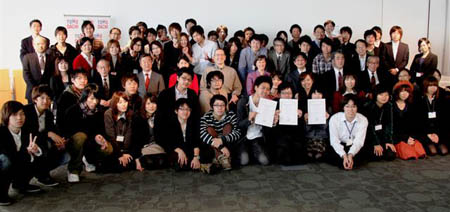
The Embassy of the United States (Tokyo American Center) partnered with Keio University held a “Entrepreneurship Seminar and Business Competition” on February 8th – 10th 2012. There are 12 teams (approx. 51 students) representing 10 different Universities from all around Japan to compete for winning recognition of their business plans and social entrepreneurship project proposals.
At this competition, me and my team represented Gunma University as “AYUMIX Team” with the business plan named “Ando-kun”, Dynamic Information Service. You may refer to the above Youtube video for further detail on the proposed idea. (Japanese only ^^;;)
At this event, there were a lot of great people who joined and gave lecture on the seminar. Such as Mr. Allen Miner, CEO of Sunbridge company and many others. The lecture were mostly talking about their experience on entrepreneurship and “Tips & Tricks” about how to be succeed in building a business.
Sometime I used to get trouble while switch-compiling between OpenCV1.1 and OpenCV2.1 project on Visual Studio 2008. It is due to some projects run well on OpenCV1.1, while some other projects are perform well on OpenCV2.1. Here are a few things need to be set when we are going to switch the OpenCV library.
1. OpenCV1.1
On Visual Studio 2008, click Tools ⇒ Option ⇒ Project and Solution (at the left side bar) ⇒ VC++ directory. Choose the “Include file” and put some of the below folder path :
Last month, my University asked me to give a presentation in front of local companies about the latest condition of my country Indonesia. The presentation was scheduled to be delivered on November 1st in a seminar called “Chinese Business Research 2011 / 平成23年度 第一回 中国ビジネス研究会” held in Gunma University. The main purpose of the seminar is to give information (and discussion) to the local companies around Gunma prefecture about the current business condition in Asia (especially China, Indonesia and Vietnam).
The topic of my presentation is mostly talk about the recent condition in Indonesia observed from many aspects such as economy, social & culture, demography, etc. You may refer to the below slideshow for more detail about my presentation, or click this link for full presentation.
The presentation was delivered in Japanese around 30 minutes and additional 15 minutes discussion. This is actually my first experience to give a presentation in front of many Japanese company’s leaders. Thanks God, I could manage to present it well and answered all the questions from the audience.
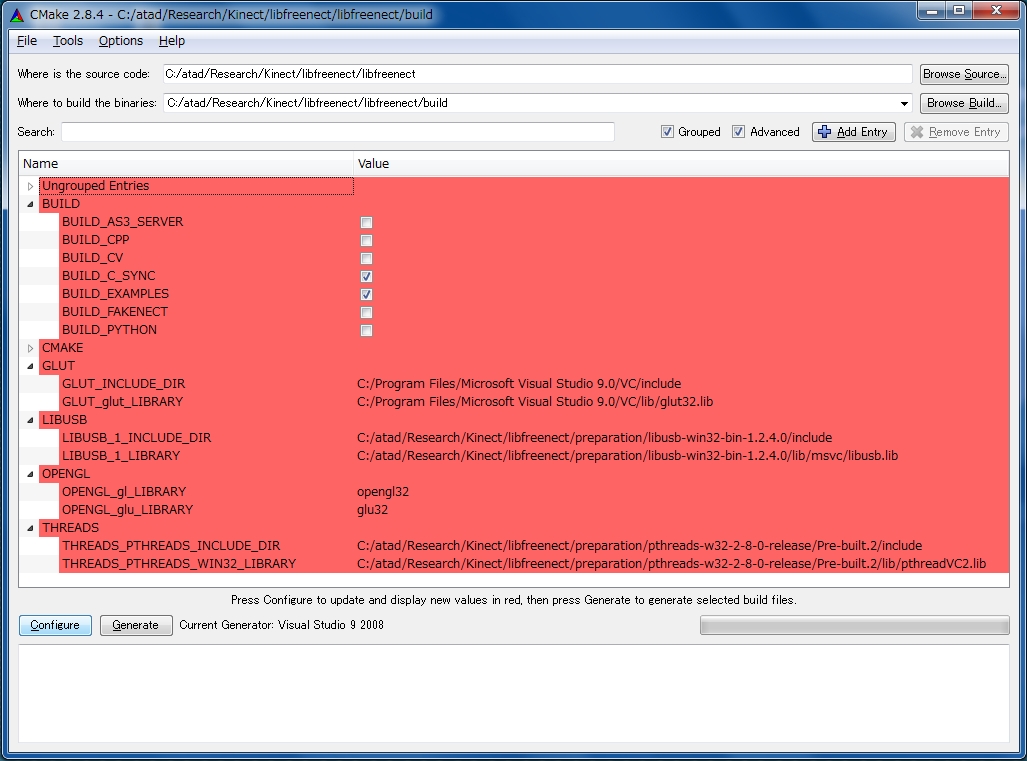
After struggling several days with all stuff related to OpenKinect (libfreenect) and Microsoft Visual Studio 2008, finally I could execute the experiment on getting the Kinect RGB-Depth image wrapped with the OpenCV2.1 library functions.
Or, the below code is taken from Tisham’s page which then combined with Canny Filter operation :
(comment out all the glview.c code and replace with the below source code)
/* freenectopencv.cpp
Copyright (C) 2010 Arne Bernin
This code is licensed to you under the terms of the GNU GPL, version 2 or version 3;
see:
http://www.gnu.org/licenses/old-licenses/gpl-2.0.txt
http://www.gnu.org/licenses/gpl-3.0.txt
*/

/*
 * Makefile for ubuntu, assumes that libfreenect.a is in /usr/lib, and libfreenect.h is in /usr/include
 *
 * make sure you have the latest version of freenect from git!

***************************************************************************************************************************
* Makefile
***************************************************************************************************************************
CXXFLAGS = -O2 -g -Wall -fmessage-length=0 `pkg-config opencv --cflags ` -I /usr/include/libusb-1.0

OBJS = freenectopencv.o

LIBS = `pkg-config opencv --libs` -lfreenect

TARGET = kinectopencv

$(TARGET): $(OBJS)
$(CXX) -o $(TARGET) $(OBJS) $(LIBS)

all: $(TARGET)

clean:
rm -f $(OBJS) $(TARGET)

*************************************************************************************************** * End of Makefile
***************************************************************************************************
*/

#include <stdio.h>
#include <string.h>
#include <math.h>

#include <libfreenect.h>
#include <pthread.h>

#define CV_NO_BACKWARD_COMPATIBILITY

#include <cv.h>
#include <highgui.h>

#define FREENECTOPENCV_WINDOW_D "Depthimage"
#define FREENECTOPENCV_WINDOW_N "Normalimage"
#define FREENECTOPENCV_RGB_DEPTH 3
#define FREENECTOPENCV_DEPTH_DEPTH 1
#define FREENECTOPENCV_RGB_WIDTH 640
#define FREENECTOPENCV_RGB_HEIGHT 480
#define FREENECTOPENCV_DEPTH_WIDTH 640
#define FREENECTOPENCV_DEPTH_HEIGHT 480

IplImage* depthimg = 0;
IplImage* rgbimg = 0;
IplImage* tempimg = 0;
IplImage* canny_img = 0;
IplImage* canny_temp = 0;
pthread_mutex_t mutex_depth = PTHREAD_MUTEX_INITIALIZER;
pthread_mutex_t mutex_rgb = PTHREAD_MUTEX_INITIALIZER;
pthread_t cv_thread;

// callback for depthimage, called by libfreenect
void depth_cb(freenect_device *dev, void *depth, uint32_t timestamp)

{
        cv::Mat depth8;
        cv::Mat mydepth = cv::Mat( FREENECTOPENCV_DEPTH_WIDTH,FREENECTOPENCV_DEPTH_HEIGHT, CV_16UC1, depth);

        mydepth.convertTo(depth8, CV_8UC1, 1.0/4.0);
        pthread_mutex_lock( &mutex_depth );
        memcpy(depthimg->imageData, depth8.data, 640*480);
        // unlock mutex
        pthread_mutex_unlock( &mutex_depth );

}

// callback for rgbimage, called by libfreenect

void rgb_cb(freenect_device *dev, void *rgb, uint32_t timestamp)
{

        // lock mutex for opencv rgb image
        pthread_mutex_lock( &mutex_rgb );
        memcpy(rgbimg->imageData, rgb, FREENECT_VIDEO_RGB_SIZE);
        // unlock mutex
        pthread_mutex_unlock( &mutex_rgb );
}

/*
 * thread for displaying the opencv content
 */
void *cv_threadfunc (void *ptr) {
        cvNamedWindow( FREENECTOPENCV_WINDOW_D, CV_WINDOW_AUTOSIZE );
        cvNamedWindow( FREENECTOPENCV_WINDOW_N, CV_WINDOW_AUTOSIZE );
		cvNamedWindow( "Canny Image", CV_WINDOW_AUTOSIZE );
		cvNamedWindow( "Depth Canny", CV_WINDOW_AUTOSIZE );
        depthimg = cvCreateImage(cvSize(FREENECTOPENCV_DEPTH_WIDTH, FREENECTOPENCV_DEPTH_HEIGHT), IPL_DEPTH_8U, FREENECTOPENCV_DEPTH_DEPTH);
        rgbimg = cvCreateImage(cvSize(FREENECTOPENCV_RGB_WIDTH, FREENECTOPENCV_RGB_HEIGHT), IPL_DEPTH_8U, FREENECTOPENCV_RGB_DEPTH);
        tempimg = cvCreateImage(cvSize(FREENECTOPENCV_RGB_WIDTH, FREENECTOPENCV_RGB_HEIGHT), IPL_DEPTH_8U, FREENECTOPENCV_RGB_DEPTH);
		canny_img = cvCreateImage(cvSize(FREENECTOPENCV_RGB_WIDTH, FREENECTOPENCV_RGB_HEIGHT), IPL_DEPTH_8U, 1);
		canny_temp = cvCreateImage(cvSize(FREENECTOPENCV_DEPTH_WIDTH, FREENECTOPENCV_DEPTH_HEIGHT), IPL_DEPTH_8U, FREENECTOPENCV_DEPTH_DEPTH);

        // use image polling
        while (1) {
                //lock mutex for depth image
                pthread_mutex_lock( &mutex_depth );
                // show image to window
                cvCanny(depthimg, canny_temp, 50.0, 200.0, 3);
				cvCvtColor(depthimg,tempimg,CV_GRAY2BGR);
                cvCvtColor(tempimg,tempimg,CV_HSV2BGR);

                cvShowImage(FREENECTOPENCV_WINDOW_D,tempimg);
				cvShowImage("Depth Canny", canny_temp);
                //unlock mutex for depth image
                pthread_mutex_unlock( &mutex_depth );

                //lock mutex for rgb image
                pthread_mutex_lock( &mutex_rgb );
                // show image to window
                cvCvtColor(rgbimg,tempimg,CV_BGR2RGB);
				cvCvtColor(tempimg, canny_img, CV_BGR2GRAY);
                cvShowImage(FREENECTOPENCV_WINDOW_N, tempimg);

				// Canny filter
				cvCanny(canny_img, canny_img, 50.0, 200.0, 3);
				cvShowImage("Canny Image", canny_img);
                //unlock mutex
                pthread_mutex_unlock( &mutex_rgb );

                // wait for quit key
                if( cvWaitKey( 15 )==27 )
                                break;

        }
        pthread_exit(NULL);

		return NULL;

}

int main(int argc, char **argv)
{

        freenect_context *f_ctx;
        freenect_device *f_dev;

        int res = 0;
        int die = 0;
        printf("Kinect camera test\n");

        if (freenect_init(&f_ctx, NULL) < 0) {
                        printf("freenect_init() failed\n");
                        return 1;
                }

                if (freenect_open_device(f_ctx, &f_dev, 0) < 0) {
                        printf("Could not open device\n");
                        return 1;
                }

        freenect_set_depth_callback(f_dev, depth_cb);
        freenect_set_video_callback(f_dev, rgb_cb);
        freenect_set_video_format(f_dev, FREENECT_VIDEO_RGB);

        // create opencv display thread
        res = pthread_create(&cv_thread, NULL, cv_threadfunc, (void*) depthimg);
        if (res) {
                printf("pthread_create failed\n");
                return 1;
        }

        printf("init done\n");

        freenect_start_depth(f_dev);
        freenect_start_video(f_dev);

        while(!die && freenect_process_events(f_ctx) >= 0 );

}
Please notice that I am using : libfreenect for Windows + Microsoft Visual Studio 9 (2008) + OpenCV 2.1
 Bagi rekan-rekan yang saat ini sedang sibuk ikutan seminar mencari kerja (job hunting) atau sedang pergi sana pergi sini untuk tes / interview lamaran kerja mungkin terkadang sering merasakan kejenuhan atau bahkan CAPEK lahir batin karena belum ada respon dari perusahaan yang memanggil kita wawancara. Saya pun pernah merasakan hal yang sama ketika beberapa waktu lalu mencoba berjuang melamar kerja ke beberapa perusahaan di negeri Sakura.


 Catatan Fahmi
Recent Comments